

Audience: Driver App Pre-Release Testers
Read Time: 2 Minutes
This article summarizes the Pre-Release Testing Opt-in process for Android and IOS Users of the FASTTRAK Driver App.
FASTTRAK is releasing a new version of the FASTTRAK Driver App in Q2 2026. This version has significant changes from the current Driver App version. While no functionality has been removed, the overall user experience has been modified. For this reason, FASTTRAK has made the app available in a Pre-Release mode. This allows external users such as yourself to test the app and provide relevant feedback prior to publishing to all users.
Please review the section below according to your device type.
TABLE OF CONTENTS
Overall Expectations
The purpose of the Pre-Release program is to allow operators the ability to preview the new Driver App and provide operational feedback on the overall usability of the app. It is up to the operator to decide which users should have access.
All operations, settings and overall workflow are specific to each individual operator. Furthermore, FASTTRAK cannot ensure operational continuity across multiple contacts within an organization. For this reason, there should be a single point of contact to coordinate operational feedback and/or issues through FASTTRAK support.
All Pre-Release program feedback and support should be sent to driverapp@fasttrakcloud.com. |
Pre-Release Signup Information
To become a Beta Test user, please provide the following:
- Name of operator
- Primary Beta testing contact (for support/feedback coordination)
- Expected number of drivers that will be using the Pre-Release application
- Send all Pre-Release requests to driverapp@fasttrakcloud.com
Additional Comments:
- You are able to have one or more users on the new Pre-Release version while keeping all other users on the current version.
- You are able to revert back to the current version if you run into trouble with the Pre-Release version.
- Any Pre Release updates will be communicated to you by FASTTRAK support and the app will be updated either automatically (if auto-update is enabled) or manually is auto-update is disabled.
- Any issues/concerns can be sent to driverapp@fasttrakcloud.com. Also, you can use TestFlight on IOS to submit feedback directly in the app.
Google Play Testing (Android users) |
To Join the program
- The Opt-In to the Beta test is straight forward:
- Send the required info to driverapp@fasttrakcloud.com
- Operator name
- Primary operator contact
- Play store email address
- Send the required info to driverapp@fasttrakcloud.com
- Beta approval will be confirmed ASAP; usually within 1-2 hours during business hours
- Once approved:
- FASTTRAK will send you a link to Opt-In Link to the pre-release.
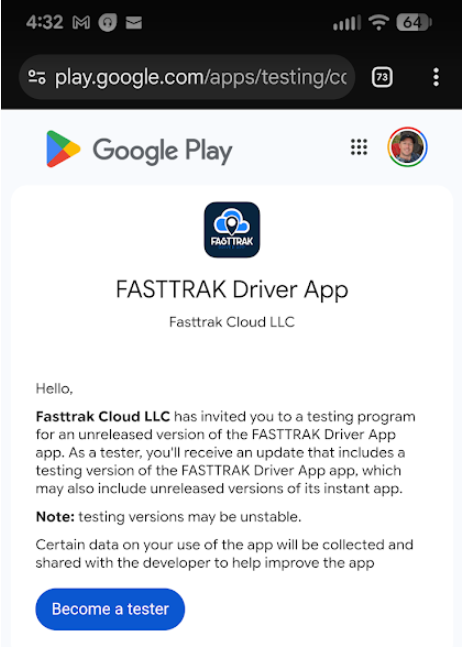
- From your Android device, click the provided link to join the test program.
- You will see the screen below.
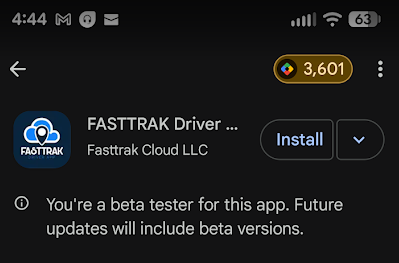
- Once joined, Open the Google Play Store on your android device
- It will note you as a Beta tester and allow you to download the Pre Release version.
- Confirm acceptance of terms
- Install the new Driver app
- Note: Any Pre Release updates will be communicated to you by FASTTRAK. You can access the Google Play store to update to the latest version as necessary.
To leave the program:
- Access the Google Play Store on your android device
- Click the Leave the Beta button that is now available
- Confirm choice to uninstall the Beta version of the app
- To re-install the Current version of the app
- Access the Google Play Store on your android device
- Install the current Driver app version using the Install button
App Store Testing (IOS users) |
To Join the program
- The Opt-In to the Beta test is straight forward:
- Send the required info to driverapp@fasttrakcloud.com
- Operator name
- Primary operator contact
- Play store email address
- Send the required info to driverapp@fasttrakcloud.com
- Beta approval will be confirmed ASAP; usually within 1-2 hours during business hours
- Once approved:
- Install test Flight from the App Store and accept terms
- You will see the FASTTRAK Driver App in Test Flight
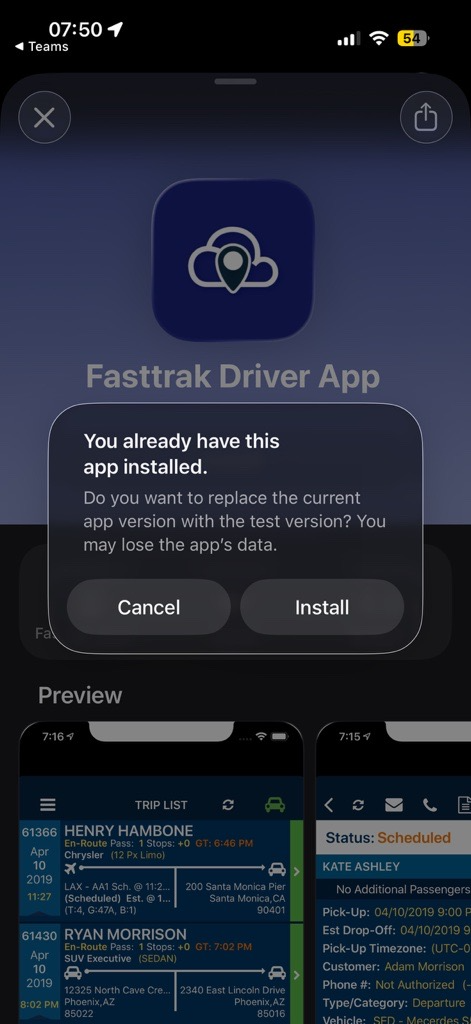
- Click to install the app
- You now have the Pre-Release version of the app
- Note: Any Pre Release updates will be communicated to you by FASTTRAK. You can access the Google Play store to update to the latest version as necessary.
To leave the program:
- Access Test Flight
- Click Stop testing from the Driver App
- This will remove the app from your device
- To re-install the Current version of the app
- Access the IOS App Store on your IOS device
- Install the current Driver app version